






Crystals shine when it comes to achieving pristine audio quality, with fiber-optic sound cables, also known as optical audio cables, being a favored application among audiophiles and tech enthusiasts. These sturdy cables utilize the principles of light transmission to deliver crystal-clear sound, free from the interference or degradation typically associated with electronics using ordinary wires. What, then, makes these fiber optic sound cables special? How do they work, and why should one even consider including them in an entertainment or professional audio setup? This detailed guide will unravel the mysteries of optical audio cables, informing you about their benefits, uses, and key features to look for when selecting the right cable for your needs. From setting up a contemporary home theater system to just satisfying your curiosity about this set of wires, this article is going to be your buddy.
Understanding Fiber Optic Cables

Fiber optic cables are the highest-grade cables used in the transmission of data and audio signals through light. In contrast to metallic copper cables, they transfer information by means of light pulses, thereby enabling fast transmissions and eliminating interference. These are thin strands of glass or plastic, which are an excellent solution for transmitting signals over long distances without compromising quality. They are installed to interconnect devices such as home theater systems, game consoles, and professional audio equipment that require the clearest sound quality. Optical cables are robust and reliable, reducing signal interference from electromagnetic discharges.
What is a Fiber Optic Cable?
Modern data transmission tools, such as fiber optics, use light signals to carry information at exceptional speeds. Fiber optic cable has a core composed of fragile strands of glass or plastic, and a cladding surrounding it that reflects light into the core. More bandwidth is available with fiber optics than with traditional copper wires, and data can be transmitted over very long distances with hardly any deterioration in signal quality.
Fiber optic cables can theoretically achieve speeds of hundreds of terabits per second, making them suitable for services where bandwidth is at a premium, such as Internet backbones, telecommunications, and medical imaging. Additionally, they are impervious to electromagnetic interference, ensuring a stable and reliable connection. These cables also enable the 5G networks and ultra-high-speed broadband, the backbone for the rapid expansion of digital infrastructure.
A key feature of fiber optics is its scalability. Single-mode fibers have found applications in large-scale projects, as they transmit data over distances exceeding 60 miles without requiring amplification. When it comes to relatively shorter distances, such as within buildings or data centers, multimode fibers are cost-effective, thus meeting a variety of industry requirements. The invention is continually transforming global communication and data management systems, serving as the glue for the new connected world.
How Fiber Optic Cables Work
Fiber optic cables transmit data as light signals through thin strands of glass or plastic fibers. These fibers are fragile, almost the diameter of a human hair, yet they can carry vast amounts of data and transmit it at incredible speeds. The technology fundamentally applies principles from physics, mainly concerning total internal reflection, to steer light through the cable’s core.
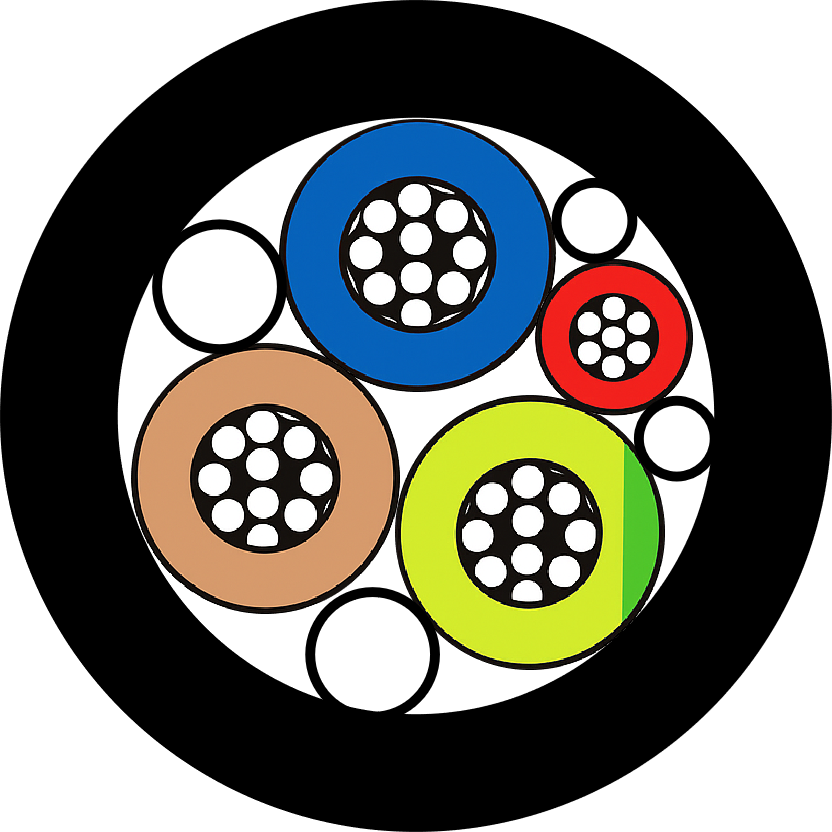
The design of a fiber optic cable holds three significant components: the core, the cladding, and the protective coating. The core consists of highly pure glass or plastic through which light signals travel. Between the core and the cladding lies a layer with a refractive index less than that of the core, allowing light signals to bounce back into the core for uninterrupted transfer. Outside this, there is a protective coating that guards the cable against environmental harm and physical pressure.
Performance Specifications
- Data transfer speeds of 100 Gbps or higher
- Single-mode fibers transmit data over distances exceeding 25 miles without degradation
- Multimode fibers offer distances up to 1.2 miles
- Unaffected by electromagnetic disturbances
- Scalable nature addresses bandwidth demands effectively
Single-mode fibers are primarily used for long-distance and high-capacity applications, such as telecommunications and the backbone of the Internet. Multimode fibers offer somewhat limited distances (usually up to 1.2 miles); thus, they are perfect for LANs and data center applications.
In modern times, clever developments in fiber optics include Wavelength-Division Multiplexing (WDM), which allows multiple data channels to be sent concurrently over a single fiber. This remarkable discovery has significantly increased the data capacity of fiber optic systems, thereby ensuring a prominent place for them in the global realm of communication networks.
Benefits of Using Fiber Optic Cables
Fiber optic cables impart numerous benefits to communication networks. Probably the most significant would be the lightning-fast speed of data transmission. Fiber optic cables, in effect, have given a substantial edge in performance over conventional copper cables, which take more time to transmit data. In some cases, fiber optic networks have been reported to achieve a benchmark speed of 1 Gbps for residential purposes and significantly higher speeds for commercial installations, thus facing the ever-growing demands of data-intensive applications such as video streaming and cloud computing.
Key Advantages
- High Bandwidth Capacity: Can carry infinitesimally higher data loads using techniques like Wavelength-Division Multiplexing (WDM)
- EMI Resistance: Immune to electromagnetic interference, ensuring stable connections
- Long-Distance Performance: Less attenuation over long distances without frequent amplification
- Durability: More resilient than copper cables against environmental threats
- Enhanced Security: Difficult to tap or intercept signals compared to copper cables
- Lightweight and Flexible: Easier installation and potential labor cost savings
Great bandwidth capacity is another significant advantage. Unlike in the case of copper cables, fiber optic cables can carry infinitesimally higher data loads, courtesy of techniques such as Wavelength-Division Multiplexing (WDM). This feature makes them suitable for large networks and high-demand situations, like data centers and international data transfer systems.
Finally, fiber optic technology offers enhanced security for transmitted data. Fiber optics phases out signal tapping or interception, unlike copper cables; hence, they are well-suited for secure communications of sensitive messages in industries such as defense or finance. Thus, fiber optic cables remain the nerve center of modern networks, paving the way for technological innovation and seamless connectivity worldwide.
Types of Optical Audio Cables

Typically, optical audio cables feature Toslink and Mini-Toslink as their standard connectors.
TOSLINK Cables Explained
Optical fiber-type audio cables are most commonly known as TOSLINK cables, a short form of Toshiba Link. They offer a quality installation with noise-free functioning, utilizing light for transmission instead of electrical signals, which are susceptible to electromagnetic interference. Manufactured by Toshiba, these cables are used in various audio applications, including home theater systems, gaming consoles, and soundbars.
| Cable Type | Description | Primary Use | Port Compatibility |
|---|---|---|---|
| Toslink Cables | Standard optical audio cables for home theaters and gaming systems | Home theaters, gaming systems, sound systems | Full-size optical ports |
| Mini-Toslink Cables | Smaller cables designed for devices with limited space | Laptops and compact audio equipment | Specialized audio ports, smaller optical ports |
TOSLINK cables support Dolby Digital, DTS, and PCM audio formats, providing crystal-clear and precise sound. Sounds are ideally suited for transmission from TVs, Blu-ray players, and streaming boxes through speakers or AV receivers. TOSLINK connectors fit full-size optical ports, while Mini-TOSLINK connectors are designed for smaller optical ports, primarily used in laptops and portable audio equipment.
While TOSLINK is designed to be dependable and straightforward, it does have a limitation: an optimal cable length of about 5-10 meters for acceptable signal quality. Besides that, it is bandwidth-limited, unlike newer ones, such as HDMI, which also convey video signals. Such limitations notwithstanding, TOSLINK remains in good standing with audiophiles due to its affordability and dependable audio quality.
Digital Optical Audio Cables vs. HDMI
There are several aspects to consider when evaluating digital optical audio cables against HDMI, including performance, functionality, and compatibility. HDMI, being capable of carrying both audio and video signals, is hence ideally suited for both home theater and modern devices. It supports lossless audio formats like Dolby TrueHD and DTS-HD Master Audio to deliver unmatched sound quality for HD content. Since bandwidth is greater over HDMI, it also enables multi-channel audio systems and advanced technology implementations, such as Dolby Atmos.
| Feature | TOSLINK | HDMI |
|---|---|---|
| Signal Type | Audio-only transmission | Both audio and video signals |
| Audio Quality | Exceptional audio for stereo and surround sound (up to 5.1 channels) | Supports lossless formats like Dolby TrueHD and DTS-HD Master Audio |
| Bandwidth | Limited bandwidth | Greater bandwidth for advanced implementations |
| Interference | Immune to electrical interference | Can be affected by electromagnetic interference |
| Cost | More affordable | Generally more expensive |
| Compatibility | Works with older equipment lacking HDMI | Best for modern HD setups |
The great advantage of TOSLINK is its audio-only transmission capability. It delivers exceptional audio quality for standard stereo and surround sound (up to 5.1 channels), but lacks the bandwidth for uncompressed methods, unlike HDMI. However, TOSLINK has specific applications where electrical interference is a concern, while its fiber design keeps the signal interference-free. For a situation where the equipment is old and not HDMI-equipped, it can be considered a worthy contender simply because it is inexpensive and works well.
Choosing the Right Cable for Your Setup
When choosing between TOSLINK and HDMI, it’s best to weigh the needs of your devices and setup. HDMI works great with the new systems, transmitting both audio and video, and even supports advanced formats like Dolby Atmos and 4K resolution. In other words, HDMI is the preferred choice for a full-blown HD home theater or gaming setup. TOSLINK, on the other hand, is more suitable for audio-only installations or connecting older devices that lack HDMI ports, ensuring that sound is transmitted without interference, thanks to its fiber-optic design.
To wrap things up, consider whether you want an advanced audiovisual setup that also offers the convenience of carrying just one cable; then opt for HDMI! Conversely, for simpler setups, especially those focusing on audio or involving fairly old components, consider TOSLINK, which operates efficiently and cost-effectively. Once you’ve wrapped your head around your gear and needs, it becomes easier to decide which cable works the best for the performance bonus.
Using Fiber Optic Cables with Soundbars

Soundbars can be connected wirelessly to audio sources using fiber optic cables, such as TOSLINK. It transmits digital audio signals with minimal interference, ensuring clean and immersive sound. Plug one end of the fiber optic cable into the optical output port situated on the audio source (such as a television). In contrast, the other end is connected to the optical input port located on the soundbar. Proceed to turn on both devices and set them to the assigned output/input settings for optical audio. The installation process is straightforward and well-documented, providing reliable performance for televisions and soundbars that require HDMI ARC support.
Setting Up a Soundbar with Fiber Optic Cables
Step-by-Step Setup Guide
1. What type of cable does this setup require?
You will need a fiber optic cable, also called a TOSLINK cable, for the digital transmission of the audio signal.
2. How is the cable connected?
Take one end of the fiber optic cable and plug it into the optical output of your audio source (like a TV); at the other end, plug the fiber optic cable into the optical input of your soundbar. Ensure the cable connectors are aligned perfectly and fit snugly into their ports.
3. How do I set it up for optical audio?
Go to the audio settings menu of your TV or audio source and select “Optical” or “Digital Output” as the audio output option. Then, select the optical input on the soundbar.
4. Do I need any additional gear for this connection?
Typically, newer gear will not require any additional pieces. However, ensure that your cable is not damaged and that both devices support optical audio connections.
5. Why is there no sound after setting up?
Ensure that the devices are turned on, with the cable connected properly and the correct input/output settings selected. Also, check if the devices have audio mute or volume issues.
Advantages of Fiber Optic Soundbars
Fiber optic soundbars offer numerous advantages, enhancing the end-user’s audio experience. Let us quickly list the benefits:
High Fidelity in Audio Transmission
The clarity of a fiber optic cable lies in its ability to transmit digitally encoded audio signals without any interference. It also works quite well in various setups, such as cinemas, music stages, and gaming, making it a top-notch choice in terms of audio quality.
Electrical Interference Immunity
While traditional cables suffer from electrical interference and signal drops, fiber optic connections remain immune to these anomalies and ensure a constant and reliable audio connection even when surrounded by numerous electronic devices.
Easy Setup and Compatibility
Since most modern soundbars and audio devices support fiber optic connections, setting them up is pretty quick and easy. A user just needs to grab their working optical cable and the two devices that support it; there is usually no need for other equipment.
Supports Surround Sound
The fiber-optic cable enables surround sound systems to transfer rich, multi-channel audio, such as Dolby Digital or DTS, which enhances the depth and ambiance of your entertainment.
Durability and Stability
The fiber optic cable remains highly durable against wear and tear, less prone to forms of damage familiar with traditional copper or HDMI cables. They track audio over long distances without degradation, adaptable to almost any home theater system.
Utilizing these benefits makes the fiber optic soundbar an unparalleled experience, combining convenience with high performance.
Common Issues and Troubleshooting
With fiber optic soundbar technology having reached such a high level of modernity, users occasionally encounter their share of typical issues. The following are brief solutions to address them:
No Sound from the Soundbar
- Check Cable Connections: Ensure the fiber optic cable is securely attached to both the soundbar and the audio source.
- Select the Correct Input: Ensure the soundbar is in optical input mode.
- Check the Cable: Worn-out cables can hinder audio signals, so replace them if one shows signs of wear.
Distorted or Intermittent Audio
- Clean the Ports: Dust or debris in the optical ports can interfere with signal quality. Clean them with a soft brush.
- Check the Cable: A faulty or bent cable can result in disruptions. Use a high-quality, undamaged fiber optic cable.
- Adjust the Audio Settings: Check whether audio formats are incompatible (e.g., Dolby Digital versus PCM) and adjust the settings accordingly.
Soundbar Not Detecting the Optical Signal
- Check Compatibility of Devices: Ensure the devices in use are compatible with the soundbar and the connected device (TV, gaming console, etc.) to confirm they support fiber optic connections.
- Restart Devices: Turn off the soundbar and connected device. Then reconnect and turn on the devices to establish an entirely new connection.
- Update Firmware: Outdated software can sometimes cause a reduction in functionality; check for updates for your soundbar and install any available updates.
These troubleshooting steps should cover most problems. If problems persist, refer to the user manual of your soundbar or contact the manufacturer’s support team for additional assistance.
Improving Sound Quality with Fiber Optic Cables
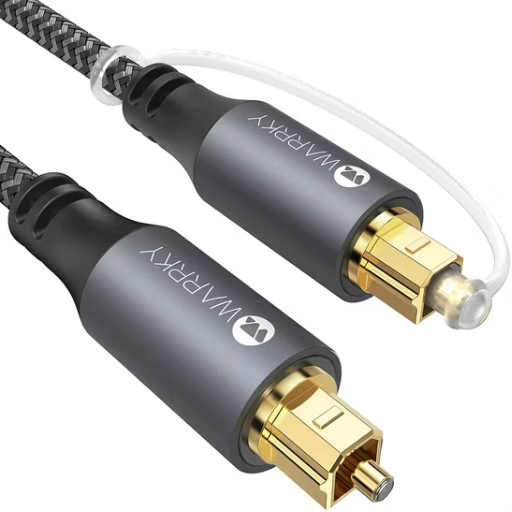
Fiber optic cables offer better sound clarity as they transmit audio signals free from electromagnetic interference. Enhance the sound quality by connecting your devices with a high-quality fiber optic cable. Ensure that the connectors are fully seated and free of dust to prevent signal interruption. Also, ensure that your audio equipment supports fiber optic input to reap the benefits of the enhanced clarity that these cables provide.
How Fiber Optic Cables Enhance Audio Quality
Fiber optic cables enhance audio quality by transmitting data in the form of pulses of light; this means that all noise caused by electromagnetic interference, which is usually associated with traditional copper wires, is eliminated. Hence, the final product is a more exacting and pure audio experience. With modern fiber transmission methods, speeds can reach 100 Gbps-the bandwidth required to accommodate high-definition audio formats without signal degradation. These make them a perfect fit for long-distance transmissions in home theaters and professional audio systems, where signal loss is intolerable. Research suggests that signal latency is cut nearly in half when transmitted through fiber optics as opposed to standard wiring, ensuring flawless synchronicity of audio under any circumstance, including the real-time ones. Additionally, their sturdiness and ability to withstand the harshness of environmental factors such as humidity and temperature differences render the fiber optic cables ideally suited for enhancing audio systems across various settings.
Gold Plated Connectors and Their Benefits
Gold-plated connectors play a crucial role in high-end audio and video equipment due to their superior conductivity and corrosion resistance. Since gold is such a noble conductor, there will be little signal erosion, and data transmission will be stable over time; this is of paramount importance for ensuring high-grade audio and video outputs. Oxidation or tarnishing is not a concern for gold, unlike some other substances, which assures long-lasting performance.
Gold-plated connectors, which reduce electrical resistance by up to 25%, enhance clarity in audio and brightness, providing a very defined video signal. They are especially advantageous in situations with humidity or temperature fluctuations in the atmosphere, where the plating keeps the connectors safe from damage. Another common factor attributed to gold plating is to make connectors durable; hence, connectors are an economical solution for the discerning user who has high-quality performance needs. When you use gold-plated connectors, they excel in A/V installations, ensuring reliability in the highest quality form, even under harsh conditions.
Tips for Optimal Sound Performance
- Use High-Quality Cables
Invest in high-quality audio cables, such as those with gold plating, because these will cause the least interference while ensuring a stable transmission of sound signals. On the other hand, inexpensive cables may compromise audio quality by introducing static or distortion. - Proper Placement of Speakers
Set the speakers at ear level for the best sound clarity. Moreover, avoid placing them too close to walls or corners, as this can boost bass frequencies beyond normal limits and disrupt the proper balance of sound. - Let the Acoustics Speak!
Think about the acoustic remnants in your room. Carpet, curtains, and furniture aid to cut down the reflection into a clear and much more immersive ambience. Moreover, acoustic panels can be used to make micro adjustments to the sound performance in larger areas. - Clean Your Equipment Regularly
Dust can settle and accumulate on equipment over time in the absence of regular cleaning, thereby compromising its performance. Therefore, clean your speakers, connectors, and components regularly to prevent signal loss or degradation. - Calibrate Your System
Use calibration tools or built-in settings in your audio device to orient levels according to your space. This balances bass, treble, and midrange tones for a more accurate soundstage. - Avoid Overcompression in Source Media
Choose formats that grant the best possible quality. A streaming provider that offers lossless audio or an uncompressed digital file format, such as FLAC or WAV, will always win over an MP3 that has undergone extreme compression. - Do Not Compromise Volume Levels
When audio is played too loudly, distortion occurs, and there is a risk of equipment damage. Keeping volume levels within the okay zones renders them transparent without distortion and equipment harm.
These tricks would certainly garner a more gratifying and premium audio experience for you, considering the type of setup you are using.
Conclusion and Final Thoughts
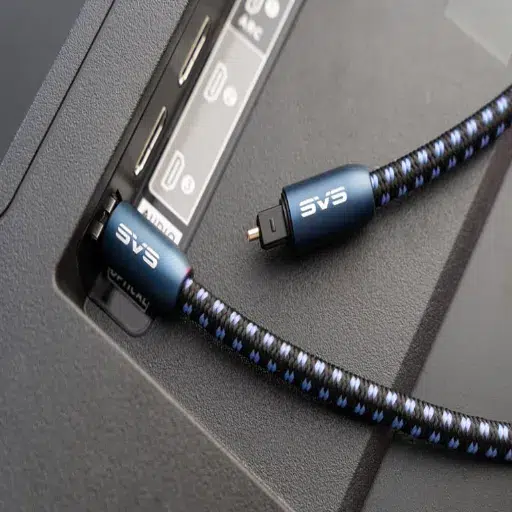
Good audio quality is not so much about the worth of the equipment as it is about the very best practices that go into it. Using the proper audio format, speaker placement, and correct volume level will enhance anyone’s listening experience. Concentrate on what works best for the room and your preferences; minor adjustments can often bring significant changes. With these measures, everyone can enjoy a very crisp and clear sound.
Summarizing the Importance of Fiber Optic Audio
Fiber optic transcendent audio is a significant advancement in sound technology, providing near-perfect audio transmission with negligible signal loss. Unlike copper cables, which carry electric current, optical fiber cables transmit audio data in the form of light, granting them a higher precision grade and resistance to electromagnetic interference. Hence, they are ideal for home theater systems, gaming environments, and serious audio enthusiasts. Another remarkable quality of fiber optic audio is that it supports high-bandwidth audio formats with surround sound, providing a more immersive experience. Additionally, they boast durability and maintain their quality over long distances, thereby proving the supremacy of fiber optic audio over modern audio systems.
Future of Optical Audio Technology
I really see a promising future for optical-type audio technology. New materials and advanced transmission techniques may further enhance bandwidth capabilities and improve audio fidelity. Therefore, miniaturization and integration with wireless technologies might provide greater versatility and accessibility to optical audio. Another aspect is its adaptation to new and immersive audio formats, which would ensure that optical audio technology itself continues to be a defining subject in cutting-edge and future audio systems.
Final Recommendations for Purchases
When selecting optical audio equipment, the materials of construction should be considered, along with aspects of mechanical robustness for transmission, as they should be durable and maintain acoustic integrity. Check if it is compatible with your audio setup and supports the more advanced formats, Dolby Digital or DTS, for a better listening experience. Established brands like Sony, Yamaha, and AudioQuest have always stood for consistent performance. Ensure that the optical cables and devices you purchase meet the requirements of length and connectivity, without compromising signal transmission. Then consider an option that would work in the near future in case there are changes in audio technology, such as integration with wireless features or support for higher bandwidth formats.
Reference Sources
Application of Fiber Optics in Water Distribution Networks for Leak Detection and Localization
Cost-effective, Cognitive Undersea Network for Tsunami Warning
Measurement and Evaluation Method of Distributed Optical Fiber Acoustic Sensing Performance
Frequently Asked Questions (FAQs)
What is a fiber optic audio cable?
A fiber optic sound cable is an audio cable that transfers digital audio signals using light between devices. It is excellent for improved audio transmission, making it ideal for connecting a soundbar or home theater system.
What precisely differentiates a Toslink cable from a fiber optic sound cable?
A Toslink cable is a type of fiber-optic sound cable used for transmitting digital audio signals. Hence, all Toslink cables are fiber optic cables; however, not all fiber optic cables support the Toslink language. The Toslink standard has enabled most manufacturers of audio equipment to produce products with optical connections.
Can I use a fiber optic cable with my soundbar?
If your soundbar or receiver has digital optical audio outputs, it is possible to connect a fiber optic cable between the soundbar and your television or other devices, thereby providing high-quality audio and enriching the sound experience.
What is a Toslink digital optical audio cable?
A Toslink digital optical audio cable represents one type of fiber optic cables that adhere to the Toslink standard used to transmit digital audio signals. It is typically used to link devices such as soundbars, TVs, and receivers to accomplish interference-free, high-quality audio reproduction.
Is the Toslink interface compatible with all audio devices?
Not all audio devices come equipped with a Toslink interface. Among contemporary devices that typically support optical connections are soundbars and home theater systems; however, it is wise to check if your equipment specifications mention compatibility with Toslink fiber optic cables.
What to look for in a digital optical audio cable?
Choosing a digital optical audio cable involves considering factors such as cable length, build quality, and compatibility with your devices. Ensure that you select the best materials to minimize signal loss and provide durability for sustained performance over time.
Can I convert my HDMI audio signal to a fiber optic signal?
Yes, with the right converter, you can convert HDMI audio to fiber optic. The converters perform an extraction task, wherein the audio signal is extracted from the HDMI input and output through a fiber optic cable, enabling the user to establish a connection with an audio system that supports only optical audio connections.