






Great sound is often at the clash of clarity and precision when it comes to connecting audio equipment. One of the hurdles audio enthusiasts face is connecting speaker wire to an RCA connector-a task that appears intimidating at first but is very much doable when paced with suitable instructions. Here is a guide that seeks to unravel the complexities of this process, supplying step-by-step directions, tips, and an understanding of the tools that may be required. Whether setting up a home theater, mending an existing system, or just doing some DIY audio work, this blog will carry you through the topic, so no more hassle in making connections. Now, let’s step off on the journey of fun!
Understanding RCA Connectors
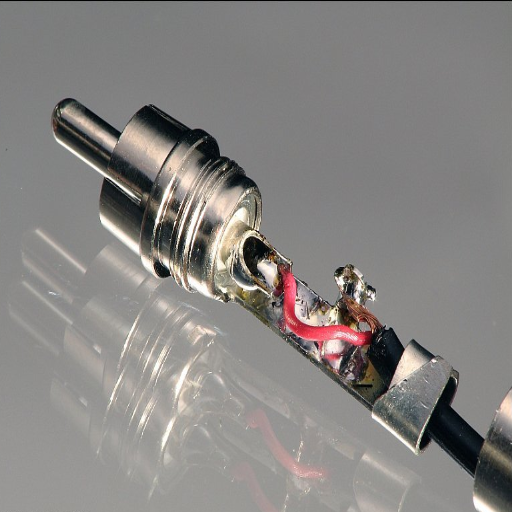
RCA connectors are utilized chiefly as an interconnector of a pair of devices to carry the audio and video signals. The structure is one that has a male plug having one central pin to carry signals; this central pin is surrounded by an outer ring, which acts as a ground. They are usually color-coded: red and white for audio, respectively, for the right channel and for the left channel; while yellow is for the video signal. RCA connectors can be compatible with older devices like DVD players and modern versions such as TVs and gaming consoles. They do well in delivering signals in standard definition and are wonderfully easy to operate, thus maintaining their popularity in simple home audio and video installations.
What is an RCA Connector?
An RCA connector usually consists of a cylindrical metal outer ring (grounding) and a central pin (signal). The cables attached must have shielding for interference purposes; by far, a figure of about 75Ω is specified for video emission. These cords gave the means for the transmission of composite video signals (480i and 576i) and stereo sound signals; hence, the standard definition goes with this equipment. Higher-quality RCA cables, such as component video cable, will split the video signal into three color-coded lines (Y, Pb/Cb, Pr/Cr) to increase video accuracy.
History and Evolution of the RCA Connectors
RCA connectors–“R” for Radio, “C” for Corporation, and “A” for America–came out in the 1940s to provide and simple means of hooking up phonographs to the now amplifier. With time, they became the standard connection in audio and video applications; however, their own special evolution has provided for a series of devices and bridging solutions for analog signals. Although the digital alternative is gaining ground, the RCA connectors, being simple in design and almost fully compatible with the hardware in the huge market, still find application-heavy demand in some fields.
Application in Modern Technology
Although the name of RCA connectors might conjure images of antiques such as VCRs, CD players, or old TVs, these connectors are still very much in use today. They are frequently auxiliary in nature and found in applications like AV receivers and home theater sound systems, vintage LP players, and retro arcade setups. Opting for RCA connectors is the easiest choice as no special setup is required; one simply has to plug in cables into the jacks of corresponding colors.
Limitations and New Age Substitutes
The RCA connector, despite being versatile, poses many limitations. Mostly being analog by nature, the longer the cable run from input to output, the signal quality deteriorates. Another limitation of RCA connectors is that they cannot carry high-definition (HD) or surround-sound signals without conversion. With modern analog options like HDMI and optical audio, RCA connectors are slowly finding themselves pushed to the sidelines of main use, yet retaining their importance for niche applications.
Types of RCA Connectors
The RCA connector comes in several varieties, each of which has different applications based on function and design:
Composite RCA Connectors
It is the more familiar type, with yellow for video and red and white for stereo audio. They are generally used for the transmission of analog video and audio signals from older devices such as VCRs, DVD players, and some gaming consoles.
Component RCA Connectors
This is a high-quality analog video type, consisting of three connectors: green (Y), blue (Pb), and red (Pr). Since component RCA cables carry resolution better than the composite kind, they have often been used for early HDTVs and enhanced definition set-ups.
Digital Coaxial RCA Connectors
Typically, orange, digital coaxial RCA connectors send digital audio signals. It supports higher-quality sound formats and is an alternative in some systems to optical audio cables.
Technically, all RCA connectors are variants of the same fundamental technology, all designed to different specifications concerning the various audiovisual needs. RCA connectors remain useful for legacy systems and certain applications, although they are slowly being lost to newer standards such as HDMI.
RCA Plug vs. RCA Jack
| Component | Type | Description | Function |
|---|---|---|---|
| RCA Plug | Male Connector | Positioned at the end of a cable with a center metal pin and an outer metal ring | Carries signals from the source component |
| RCA Jack | Female Connector | Incorporated into the device shell with a receptacle for a male pin | Receives signals on the destination device |
The two terms “RCA plug” and “RCA jack” belong to the same connection system for transmitting audio and video signals, each indicating a different part. Most times, male and female connections guarantee an analog secure means of signal transfer. Distinguishing between them is essential since these two are always interdependently working but performing different functions in the connection. RCA plugs carry signals from the source component (like a DVD player or gaming console), while the RCA jacks receive these signals on the destination device. Knowing their task ensures a correct setup and cross-device compatibility.
RCA Cable Basics
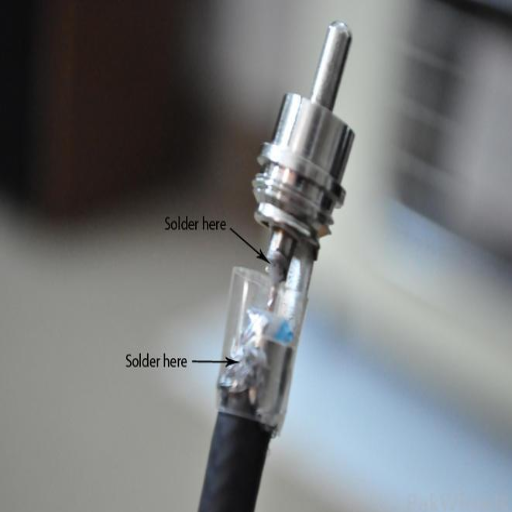
RCA cables mainly transmit audio or video in analog form between two devices. Each cable generally consists of three: an audio right connector (red), an audio left connector (white), and a video connector (yellow). The cables and connectors are designed to prevent any interference from affecting the signal, ensuring a smooth flow of information between the two devices. RCA cables can be used with TVs, DVD players, gaming consoles, and stereo systems, offering a great amount of flexibility in building one’s home entertainment system.
What is RCA Cable?
Dating back to the 1940s, RCA cables have become synonymous with audio and video technology. The name “RCA” is derived from the Radio Corporation of America, the corporation that initially invented this technology. For transmitting analog signals, these cables have earned a reputation for being very reliable and easy to use.
An RCA cable has three connectors colored differently. The red connector is meant for the right audio channel, the white or black is for the left audio channel, and the yellow connector carries composite video signals. Meanwhile, more recent versions may feature additional connectors to support more sophisticated appliances such as component video cables, which come with their own red, green, and blue connectors for higher-level video output.
In spite of the beginning-to-get-digital-more-and-more-with-HDMI-kind-of-cable kind of growing influence, RCA cables are still found in most applications. They allow compatibility with vintage devices like old gaming consoles, VCRs, DVD players, etc., in other words, in the modern age, RCA cables try to keep these devices alive. Also, RCA cables allow a maximum resolution of 480i for video playback and stereo for audio transmission, which is a fairly good coverage for any kind of classic media player.
Moving in this day and age, RCA cables are prized for their cheap-as-chips price and simple working methodology, making them the go-to option for installation shops as well as home consumers who still have to maintain some of their legacy equipment. The fact that they get offered in numerous lengths and configurations keeps them versatile in any leftover audio-visual system.
Components of an RCA Cable
An RCA cable has basically three components, all of which impart functionality and durability to it:
- Connectors: An RCA cable has a male connector at each end. Different colors have been assigned for easy reference. Yellow would take composite video signals, and white and red would be for left and right audio channels. Connectors can often be plated with gold or nickel to prevent corrosion and to promote signal transmission.
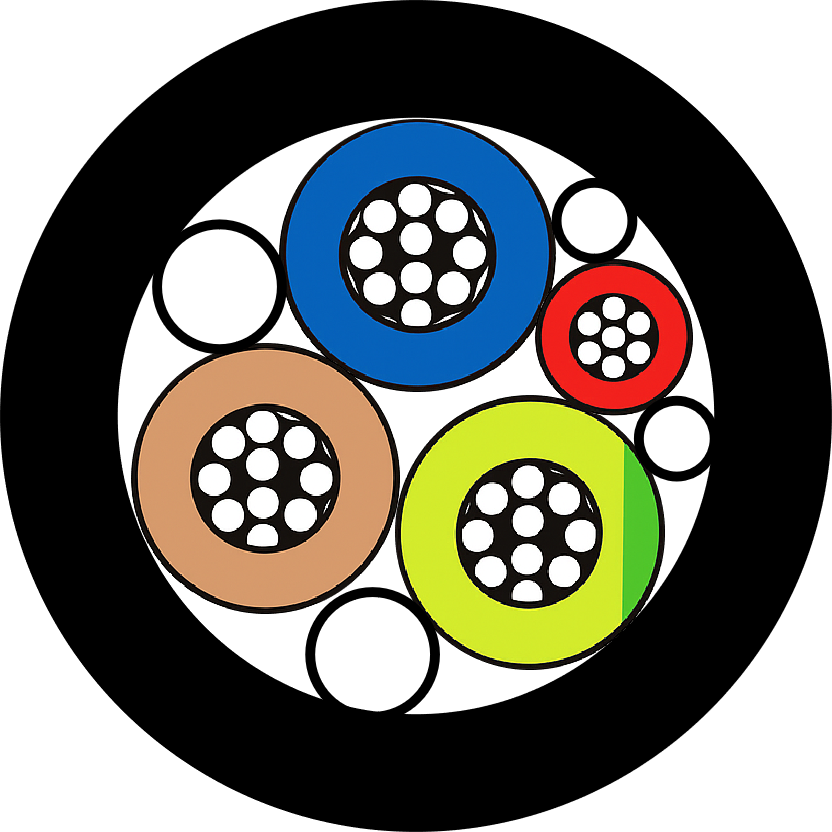
- Conductive Core: At the center of the cable lies an important component: the conductive core that transmits audio or video signals. The core is usually made of high-purity copper or Copper Clad Aluminum (CCA) to assure good conductivity and transmission with minimum signal loss.
- Insulation and Shielding: With a conductive center encased by insulation materials usually made from polyethylene or PVC to prevent signal interference, there are also shielding layers on RCA cables to protect the signal path from external EMI, either in the form of braided copper or aluminum foil.
Together, all these elements separated RCA cables into a dependable tool for device connection, exploiting the highly advanced professional audio-visual setups. Since then, the modernization of shielding materials and connectors has further enhanced the ability of RCA cables to perform excellently across other applications.
Common Uses of RCA Cables
The RCA cable is very versatile, performing various functions within an audio-visual setup. Primarily, RCA cables ensure that high-fidelity audio systems, whether amplifiers, receivers, or speakers, have proper sound transmission linkage. These cables are always at home with home theater systems, wherein subwoofers or older DVD players are linked to an AV receiver for their work. The transfer capability of analog audio signals makes it an acceptable choice for the audiophile or sound engineer.
It is also common usage for transferring video with RCA cables. An old gaming console, a VCR, and old-style video cameras will all use RCA connections for composite video signals, thus creating a bubbling necessity for these transformation cables in running down vintage media. RCA cables also act as bridges through adapters or converters from older equipment to newer technology, hence preserving functionality from one generation to the other.
Apart from these, the RCA cables for the DJ system are also used in live sound applications since they are able to connect the mixers and the audio interfaces. Whereas digital versions, such as HDMI, are becoming more popular, RCA cables still constitute an important tool to be used in circumstances where requirements are made for an analog connection or for a very particular setup. Advances in cable designs, such as gold-plated connectors and better insulation, have allowed RCA cables to acquire good signal transmission without degrading the signal quality.
Connecting Speaker Wire to RCA
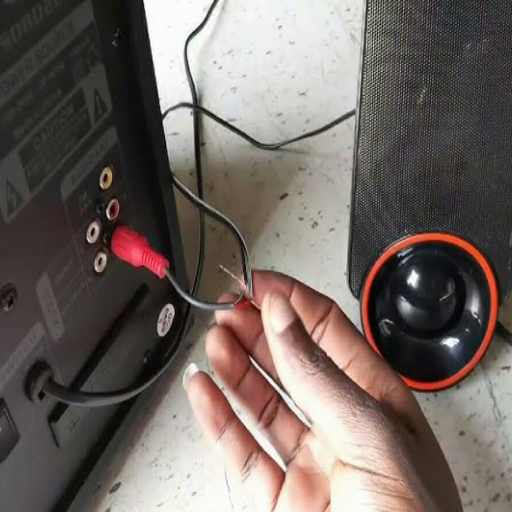
If you want to connect speaker wire to RCA, you need to have an RCA adapter or RCA connectors suitable for your speaker wire. Strip the speaker wire ends to expose the bare copper conductors. Then, attach the positive (red) and negative (black) wires to the terminals of the RCA adapter or connector, making sure the fit is secure to prevent any signal loss or interference. After connecting, insert the RCA end into the designated audio equipment, such as an amplifier or receiver. This way, you provide your own adapter to carry the analog audio signals from speaker wire into RCA inputs.
Step-by-Step Guide to Connecting Speaker Wire to RCA
- Prepare Speaker Wire: Now, strip about 1/2 inch from the insulation on either side of the speaker wire to expose bare copper conductors. Ensure that the wire ends are clean and free from any fraying for the finest connection quality.
- Identification of Positive and Negative Wires: Mostly, speaker wires are color-coded, red for positive and black for negative. Otherwise, a side could have a marking or a white stripe to identify that polarity. Correct identification of the wires is crucial in maintaining the correct flow of the signal.
- Attach Wire to RCA Connector: Loosen the screws or tabs on the RCA connector terminals. Insert the exposed positive (red) wire into the positive terminal and the negative (black) wire into the negative terminal. Tighten the screws or clamps so they hold the wires firmly, making sure the wires cannot move.
- Lock the Connections: Make sure to double-check that the wires are firmly in place inside the terminals, and no strands are sticking out that could cause a short; a firm connection ensures the best sound with no signal loss.
- Connecting RCA Ends to Audio Units: After the wires are attached, insert the RCA connector into the input jack of your audio equipment, amplifier, receiver, or subwoofer. Make sure to put it in fairly; do not force the connector, or else it may get damaged due to a positional mismatch.
- Setting up a Test: Power up the audio system and test the linkage by playing audio through the device. Adjust volume levels carefully and check for steady and clear audio output from both channels. If trouble comes in, revisit the linkage and check the wire alignment.
This guide gives a simplified process on how to convert speaker wire to RCA connectors, making sure the setup will run smoothly for your audio requirements.
Tools Required for RCA Connection
To convert speaker wire to RCA connectors, the following tools and materials will be needed:
- Speaker Wire: You must have sufficient length of speaker wire for your needs, preferably a fine-quality oxygen-free copper wire so it will carry sound with the least amount of signal loss.
- RCA Connectors: These come in male and female varieties. Identify which one your setup calls for, and try to get the gold-plated variety for better durability and conductivity.
- Wire Strippers or Cutters: Use these to strip the insulation from speaker wires cleanly and neatly without damaging the copper strands.
- Screwdriver: Needed if you are working with RCA connectors that have screw terminals as the wire securing mechanism.
- Soldering Kit (Optional): A more secure and permanent connection can be made if you use solder-type RCA connectors, which will require a soldering iron, solder wire, and flux.
- Multimeter: Useful for testing wire continuity and ensuring the connections are correct before inserting them into your audio devices.
- Heat Shrink Tubing or Electrical Tape: Used for insulating and securing exposed connections so that they do not short out.
Having these tools and materials readily on hand makes converting speaker wire to RCA connectors an easy yet dependable process. It is important to prepare well to ensure the audio signal is of high quality, a safer, and long-lasting connection.
Tips for a Secure Connection
- Strip the Wire Properly: Carrying out the stripping process using wire strippers assures the clean removal of the insulation without damaging the wire strands. This assures perfect contact and prevents weak connections or signal loss.
- Twist Strands Tightly: After stripping the wire, make sure you twist the strands tightly to keep them together. This prevents to a great extent the strands from fraying and fits better into the RCA connector.
- Use Quality RCA Connectors: The best RCA connectors, preferably gold-plated or made of corrosion-resistant material, should be used. These provide better conductivity and reduce wear over time.
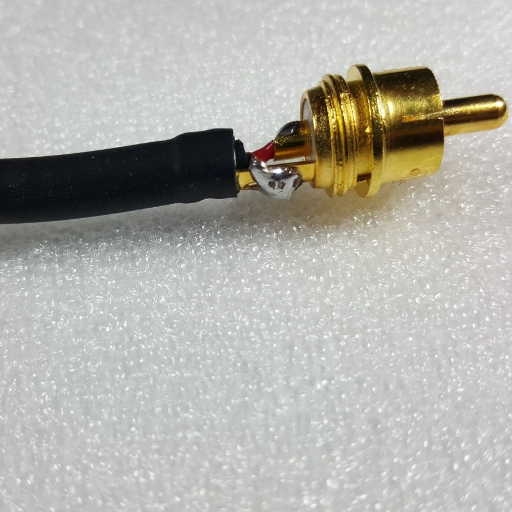
- Seal Using Heat-Shrink Tubing or Tape: After completing the wire soldering with the RCA connector, insulate it using heat-shrink tubing or electrical tape. This step will reinforce durability and lessen the chance of short circuits.
- Test Before Finalizing: Before putting in any sealing or securing procedures for the RCA connectors, test them with your audio setup for the signal quality. The early detection of any issue can help iron it out.
- Avoid Over-Bending Wires: Let wires be straight, and avoid bending unduly near the connection points, as this can weaken the attachment and eventually cause it to break.
Following these procedures would enable a safe and sure connection to be made when converting speaker wires into RCA connectors, preserving audio performance as well as being safe for the devices themselves.
Audio and Video Setup with RCA Cables
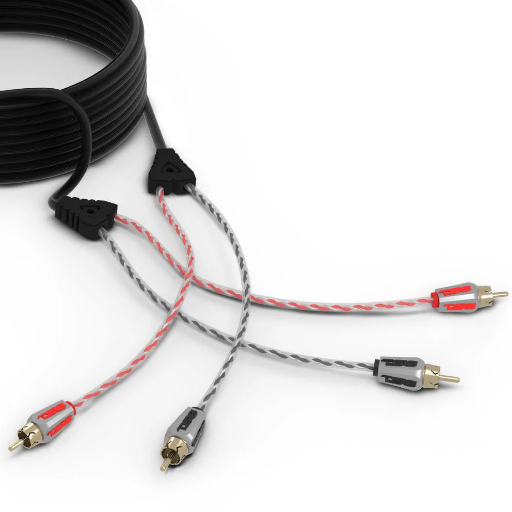
How to get started with RCA audio and video connections:
- Identify the RCA Connectors: RCA cables usually have three plugs, color-coded in red, white, and yellow. Red and white signify audio (right and left channels), and yellow denotes video.
- Connect for Audio: Plug the red and white connectors into the appropriate audio output ports of the source device, turned on at that point (could be a DVD player, gaming console, etc.). Then plug in the other ends into the audio input ports of the TV or speaker system.
- Connect for Video: Connect for video by plugging the yellow connector into the yellow video output port. Connect the other end to the television or monitor’s video input port.
- Check if All Connections Are Firmly Made: This is very important to avoid loss of signal or interference.
- Change Source: Now change the source on your TV or monitor to the input relating to the RCA connection selected (AV1 or Composite).
With these arrangements and set-up, you will get an easy and working audio and video interface with RCA cables.
Setting Up Your Home Theater with RCA
RCA cables can provide an effective and simple way to connect audio and video components in your home theater setup. Also, for the purpose of optimizing such a setup, here’s a detailed guide:
1. Understanding RCA Cables
RCA cables come with color codes for simple and easy usage-they are generally made up of red, white, and yellow connectors. Red and white cables transmit stereo audio signals: right channel and left channel, while the yellow cable carries video signals, the whole composite. A modern-day HDMI cable may stand to give you advanced functionality; however, an RCA cable remains the trusted interface among many devices, especially older ones.
2. Connecting for Surround
RCA cables are mostly useful for connection in a fairly standard stereo, but they can also be adapted to carry surround-sound audio with many audio channels. For a 5.1 surround configuration, there might be a need for multiple RCA cables or, indeed, an audio receiver that can route the signals through your speaker system. Make sure all speakers are connected properly: front, rear, and sub in order to properly enhance those surround-sound feels.
3. Video Quality Concerns
The sole limitation of RCA cables would be their inability to transmit anything higher than SD video (i.e., 480i), making them perfect for older TVs and devices such as DVD players. Should any TV aim to watch programs in HD, a component cable arrangement or an HDMI converter used together with RCA cables should be considered to cater to the higher video resolutions wherever available.
4. Cable Length and Signal Strength
Good RCA cables are intended to maintain signal integrity over a short range. Longer cable length demands an extremely high-quality shielded RCA cable to lessen any possible interference or signal losses. Such cables should always be kept unbent and never tangled. This practice would cause the signal quality to deteriorate with time.
5. Bridge Compatibility Issues with Adapters
If your home theater devices operate with different connection formats such as HDMI, optical audio, or coaxial cables, you can work out a compatibility bridge through the use of RCA adapters. These allow you to connect RCA-compatible devices to the latest technology without having to replace the whole setup.
6. Tips for Streamlining Set-Up
A well-organized setup guarantees safety and ease of access. Employ cable ties or clips that are labeled to avoid tangling of cables. This will maintain order in your area and will make tweaking or fixing things far easier in the future.
With this step-by-step guide, you will be able to work with RCA cables for a fully operational home theater system and a tailor-made AV experience that is truly gratifying for you.
RCA Connections for Audio Equipment
The RCA types of connections are a classic method for instrumentation, as various pieces of audio data sets offer the simplest route of transmitting stereophonic analog signals. Commonly used in home-audio systems, studio setups, or older devices, such connections are two ends of a huge platform bridging the gap between two generations of audio technologies.
In the usual case, an RCA cable consists of two plugs, red for the right channel and white or sometimes black for the left channel. This equipment must always be shielded from outside interference for good audio, as in the case of connecting a turntable or amplifier equipment.
RCA cables cover a vast range of frequencies to reduce losses in audio, and they are used with stereo systems or powered speakers. For example, an RCA coaxial connection can send audio frequencies up to 20 kHz, the entire audible frequency spectrum. Under good shielding and with good quality connectors, one can expect to achieve very accurate and clean signal transmissions through these RCA cables.
With digital options like HDMI and optical being commonly fitted into digital devices of the present age, RCA cables still prove worthy when working with older analog gear or legacy audio system setups. Be it connecting an old-time receiver to new speakers or hooking up a subwoofer, these cables serve to build an impressive array of options for both audiophiles and casual music lovers.
Using RCA for Composite Video
Composite video signal transmission via RCA cables shows the common use being offered to such cables. This connection usually has the yellow RCA connector. Composite video transmits signals either up to 480i or 576i, depending on the region; hence, it accommodates the perfect setup for older CRT televisions and standard-definition devices. Now, it couldn’t give such a clear separation that modern HD inputs like HDMI would. Nonetheless, it enjoys its share of reliability and compatibility with older equipment.
Unlike other video signals with very high frequency, the quality and length of the cable are important to be considered in RCA Composite Video, as signal degradation will occur if the cable is too long. These should be the best-grade, shielded cables to reduce noise and interference. It has been found that when cables exceed 25 feet in length, they begin to suffer from losses, becoming visible and affecting picture clarity and color rendition. Thus, double-buffer signals or cables of higher grade offered for long runs will surely give RCA Composite Video better performance. Ultimately, RCA Composite Video remains a great, accessible, and cheap option for those who still want to hook up their older video gear and watch standard-definition stuff.
Troubleshooting RCA Connections
When troubleshooting RCA connections, start by making sure that all cables are firmly inserted into the correct ports. Ensure that the color-coded connections (yellow for video, red and white for audio) match the correct inputs and outputs. If the picture or sound is missing, check the RCA cables for obvious damage, such as fraying and bent pins, and replace them if needed. One may-impossible-product-use-other-RCA-cables or impossible equipment to test for a hardware fault. For long cable runs, signal boosters may be worth considering to prevent signal quality from falling. Also, just check to confirm that all devices are turned on and set to the proper settings for input or output.
Common RCA Connection Issues
Typical RCA connections can experience a few issues: low signal quality, no audio or video output, static interference, etc. Here are some succinct solutions based on widespread recommendations:
- No Signal or Picture: Ensure all connections are good, and visually inspect RCA cords for damage such as fraying or bent pins. Testing with a different set of RCA cords or devices can help isolate a faulty product. Also, confirm that the input/output settings of connected devices correspond with the RCA ports in use.
- Static or Distorted Signal: It is normally the case that static interference is caused by a loose connection or damaged cable. Tighten the cable connections and replace damaged ones. Also, at times, the use of shielded RCA cables would help prevent any interference with the signal, especially when there are many electrical devices lying around.
- Signal Quality Degradation Over Long Distances: Signal quality tends to degrade in longer cable runs. A signal booster or amplifier designed for an RCA connection would thus maintain image and sound quality. Consider getting higher-quality cables if working over longer distances.
By confronting such common RCA issues when they arise, you can guarantee a stable and high-quality experience in audio and video.
How to Fix Audio Signal Problems
Once an audio signal problem arises, I first check the RCA cables, that is, whether the connections are tightly plugged in and not damaged. Then, if need be, I replace the cable if it looks worn out. I check the correct input/output settings in the audio source and in the receiving device. If nothing changes, I try to keep the cables away from possible interferences, such as power cords or other electronic devices. Finally, when the problem is stubborn, using better cables or a signal booster usually provides an answer.
When to Replace RCA Cables
RCA cables should be changed when problems with audio or video quality persist despite troubleshooting other components within the setup. Other indications of the need for replacement include physical damage to the cable: fraying, cracks in insulation, or bent connectors may all be there. The other signs might arise if there is consistent interference to disrupted signals or absence of any signals at all, all this assuming that the source and receiving devices have indeed been tested for proper functionality, cables may well have worn out with time. A good investment in quality RCA cables will further ensure networking performance and reliability with very clean connectivity and interruption-free.
Reference Sources
“Simplified Procedures in Digital Video Editing: Concepts and Technological Alternatives”
Frequently Asked Questions (FAQs)
How Do I Connect Speaker Wire to RCA?
You will require a speaker wire to an RCA adapter to connect your speaker to an RCA adapter. First, strip the speaker wire ends to expose the positive and negative wires. The positive wire will then be attached to the outer part of the RCA connector, and the negative wire to the inner part. Make sure the connection is firm and plug the RCA end into the designated audio equipment.
What Are Male RCA Connectors Used For?
RCA male connectors constitute common equipment connectors for audio and video. The male RCA connectors send line-level audio signals and are usually found on television sets, video game consoles, and home theater systems. They allow the RCA jack to act as a secure connector.
How Can I Fix Problems with RCA Connections?
The solutions for RCA connection problems are checking for loose plugs or jacks, ensuring that the cables are wired properly, and that the equipment is switched on. If a ground loop is formed or audio quality becomes poor, try plugging in another RCA cable or adjusting the ground connection to block interference.
What Is the Difference Between Composite and Component Video RCA Cables?
One single RCA plug, together with its cable, is used to send a single analog video signal, and this is called composite video. In the case of component cables, each cable carries a distinct analog video signal so that there are three separate channels, i.e., Y, Pb, and Pr. It is the best for high-end video equipment because of the higher quality offered by component video over composite.
What Kind of Cable Is Used in Audio Equipment?
The kind of cable you employ in connecting your audio equipment is going to depend on your particular setup’s requirements. Typically, RCA cables are used to connect audio components. Speaker wires, on the other hand, would be needed to connect speakers to the amplifier. Wire size and speaker wire gauge should always be suitable for your equipment to avoid signal loss.
How Do I Connect an RCA Properly?
The male RCA connectors should be aligned with their respective female sockets of different devices, and firmly pressed till the connectors click. Check that the connections are secure and are incidentally connected with the right colors to avoid distortion of any kind in the audio (generally red is for right audio, and white is for the left audio).
Can RCA Cables Be Used in a Car Audio System?
Yes, you can use RCA cables to connect car audio equipment such as amplifiers and head units. For a car audio system, as usual, it is just good practice to make sure that you have a ground connection and that your RCA plugs are compatible with your audio equipment to produce an optimal sound.
Where RCA Plugs and Jacks Are Used?
RCA plugs and jacks seek to connect various audio and video devices in signal transmission. RCA plugs and jacks are so crucial to an audio setup that they can be used to hook up to external speakers, video equipment, and other components to ensure that audio and video signals are transmitted.