






When connecting devices and transferring data, the type of USB port used can significantly alter the experience. Over time, USB technology has evolved, with USB-A and USB-C being two of the most widely used standards. But how do they differ from each other, and which one is more suited for your needs? A computer-world-oriented understanding of the key differences between USB-A and USB-C, including charging, syncing, and upgrading, is necessary. The article provides a design-oriented overview, examining functionality and highlighting the advantages that can inform your technology decisions. Stay with us to discover which USB connector is designed to fit your lifestyle today.
Introduction to USB Technology
USB, or Universal Serial Bus, is a method of attaching various devices and transferring data. It was created to ease connectivity whilst also ensuring that the device would work with any computer, phone, or storage device. USB technology allows devices to communicate, share files, and charge fast. Throughout time, USB has matured, with the latest versions guaranteeing the fastest data-transfer speeds, maximum power delivery, and an aesthetic design for ease of use and reliability. Hence, USB became one of the building blocks of today’s digital life.
What is USB?
USB stands for Universal Serial Bus. It is a standard interface technology for connecting, communicating, and powering devices. Before USB was introduced in 1996, the whole electronics industry was still considering some form of multi-type connection ports. USB has thus transformed much of the workings of electronic devices. Today, USB supports a wide range of connectivity options and, simultaneously, high-speed data transfer. Hence, it is inextricably linked to modern technology.
The newest USB version, USB4, features many enhancements over its predecessors. USB4 operates at a 40 Gbps rate, which is twice as fast as USB 3.2. USB4 incorporates Thunderbolt 3 compatibility, enabling high-performance devices, such as external GPUs, high-resolution displays, and fast storage, to interconnect seamlessly. Moreover, USB4 offers improved power delivery, allowing devices to be charged at a rate of 240 watts under USB Power Delivery 3.1. This ensures the charging capability of devices such as smartphones, laptops, and more power-hungry equipment.
Backward compatibility is another plus of USB technology: older USB devices can still connect to newer ports, but at slower rates. The British released more miniature USB connectors, such as USB-C, which were widely adopted due to the added convenience of the reversible connection. This versatility and constant innovation made USB forever intertwined with modern electronics.
Types of USB Connectors
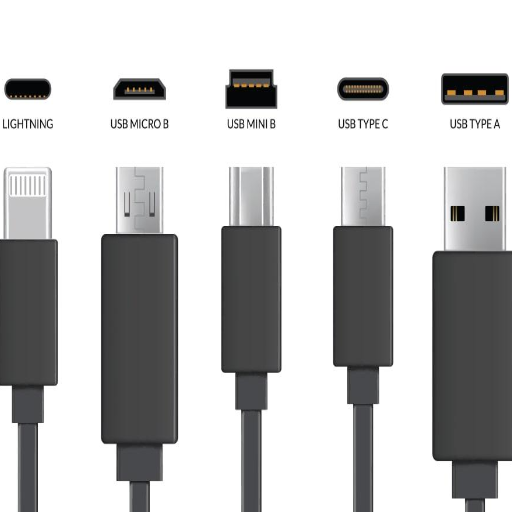
Types of USB connectors and their intended uses:
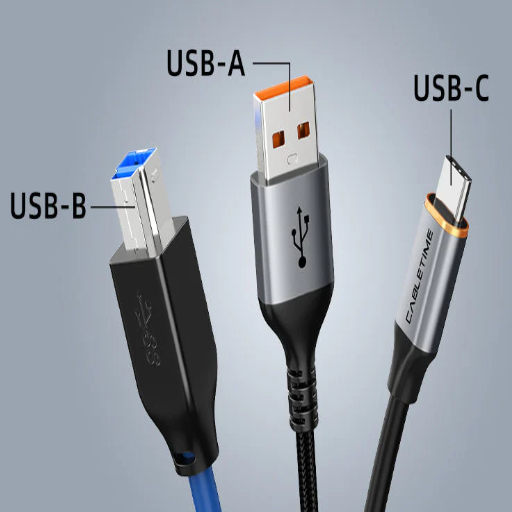
- USB-A: The standard rectangular connector, mainly used on computers or larger devices. It is most commonly interfaced with peripherals such as keyboards, mice, and flash drives.
- USB-B: Typically, a square-type connector employed in printers, scanners, and some types of external hard drives. This connector type has fallen out of favor recently as newer standards tend to get adopted.
- Mini-USB and Micro-USB: Smaller connectors intended primarily for portable devices like cameras, older smartphones, and GPS devices. Of the two, Micro-USB is still commonly found in low-budget devices.
- USB-C: The newest universal connector, small enough and reversible with support for fast transfer rates, high-wattage power delivery, and a multitude of protocols. USB-C is currently the main connector in most smartphones, laptops, and tablets in use.
Each type is ideally suited for a specific set of uses, ensuring flexibility and convenience for a wide range of electronic equipment. Compatibilities are maintained using adapters and backward compatibility as mechanisms to bridge former and newer technologies.
Overview of USB Versions
Evolution of USB: Various speed and power delivery upgrades, as well as different functionalities, have been introduced across different USB versions. An approximate view of some key versions of USB and their specifications is as follows:
| USB Version | Year Released | Max Speed | Power Delivery | Key Features |
|---|---|---|---|---|
| USB 1.0/1.1 | 1996-1998 | 12 Mbps | Basic | Original standard for basic peripherals |
| USB 2.0 | 2000 | 480 Mbps | 2.5W (5V, 0.5A) | Hi-Speed USB, a widely adopted standard |
| USB 3.0/3.1 | 2008-2013 | 5-10 Gbps | Enhanced | SuperSpeed USB, bidirectional data flow |
| USB 3.2 | 2017 | 20 Gbps | Enhanced | Dual-lane mode, USB-C focus |
| USB4 | 2019 | 40 Gbps | Up to 240W | Thunderbolt 3 compatibility, protocol tunneling |
USB 1.0 and 1.1 (1996-1998)
The original USB standards were designed to connect a few basic peripherals, such as a keyboard, mouse, and printer. USB 1.1 technically improved communication, allowing for a transfer rate of up to 12 Mbps.
USB 2.0 (2000)
Called “Hi-Speed USB,” USB 2.0 transformed the maximum data transfer rate to 480 Mbps. It also gave rise to support for higher power delivery, up to 2.5W (5V, 0.5A), which enabled the charging of more power-demanding devices, such as external hard drives. USB 2.0 became an accepted standard for almost all hardware devices.
USB 3.0 and 3.1 (2008-2013)
USB 3.0, or “SuperSpeed USB,” significantly enhances the landscape of transfer speeds with an impressive 5 Gbps figure. USB 3.1, a higher version, offers a significant boost to transfer rates, reaching 10 Gbps. Additionally, USB 3.x enhanced power efficiency and bidirectional data flow, significantly increasing device compatibility.
USB 3.2 (2017)
Continuing the heritage of faster transfer, USB 3.2 was designed to operate at 20 Gigabits per second in dual-lane mode. The introduction of USB-C connectors made this version perfect for cutting-edge high-performance devices and further focused on making the emerging technology easier to work with.
USB4 (2019)
Data transfer rates have dramatically increased, with USB4 now reaching speeds of up to 40 Gbps, matching the speed of Thunderbolt 3. It introduces protocol tunneling and further enhances compatibility with older USB specifications to ensure seamless operation with even the most obscure legacy devices. USB4 integrates with the USB-C connector and focuses on augmented performance for video streaming, big data transfers, and up to 100W of power delivery.
Each of these has benefited from the foundation laid by its predecessor to meet modern demands. Whether it’s faster transfer speeds, improved power distribution, or enhanced versatility, the evolution of USB technology exemplifies its central role in connecting and powering the world’s electronics.
Understanding USB-A
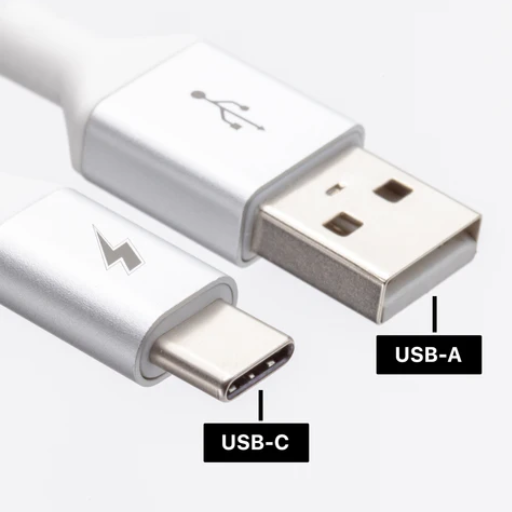
Universal Serial Bus Type-A (USB-A) is the genuine original name for the most common USB connector. It has a rectangular shape, and laptops, desktop computers, and other electronic devices are typically equipped with it. USB-A had versions of the USB standards, namely USB 2.0, 3.0, and 3.1, offering backward compatibility on the broadband level. While it has often been used to connect peripherals such as keyboards, mice, and external drives, USB-A is being phased out in favor of USB-C, which offers better attributes, including reversibility and faster data transfer rates.
Characteristics of USB-A
USB-A is one of the most common and accepted connectors because it is rectangular in shape and therefore used for various electronic devices. It has seen many generations, each with improved performance and capabilities. The main points are that USB-A can:
- Compatibility: Designs of USB-A interfaces may vary significantly. USB standards interfaced include USB 1.1, USB 2.0, USB 3.0, and USB 3.1. This ensures that older devices can still use USB-A ports alongside newer technologies, making it highly versatile.
- Data Transfer Speed: USB 2.0 transfers data at a maximum rate of 480 Mbps. On the other hand, USB 3.0, also known as SuperSpeed USB, can transmit data at a rate of up to 5 Gbps, with USB 3.1 further increasing this to 10 Gbps under ideal conditions.
- Power Delivery: USB-A is also used to deliver power to charge devices, with USB 3.0 capable of charging at up to 0.9A, an improvement from the 0.5A charging rate of USB 2.0. Newer variations within USB Battery Charging specifications, however, provide more current profiles to enable faster charging.
- Applications: USB-A ports are still widely used to connect peripherals, including keyboards, mice, USB flash drives, and printers. One can also consider them as charging ports for devices such as external hard drives, smartphones, and tablets.
- Durability: The connector type is designed and built to sustain an average rated insertion-and-removal cycle life of somewhere between 1,500 and 5,000, depending upon the implementation.
- Physical Aspects: The classic design features a USB-A connector size of approximately 12.0 mm × 4.5 mm, with a sturdy and recognizable design. However, the design is not reversible, so it is essential to insert it into the port properly; this approach is opposite to that of newer reversible designs, such as USB-C.
In other words, as USB-A gradually fades away in modern devices due to the convenience enhancements brought forth by USB-C and others, its widespread usage, backward compatibility, and value retention have made it an essential standard for years.
Common Uses of USB-A
With a universal go-anywhere capability, USB-A connectors are utilized by a myriad of devices and applications. Some of the typical uses include:
- Data Transfer – USB-A is often used to connect external mass storage devices, such as flash drives, external hard drives, and smartphones, to computers for file transfer and backup purposes.
- Peripheral Connections – Many peripheral devices, such as keyboards, mice, printers, and scanners, require USB-A connectivity for seamless integration into computers and other systems.
- Charging Devices – USB-A ports in wall adapters, power banks, and computers make it very desirable for charging devices such as smartphones, tablets, and wearables.
- Media and Entertainment – USB-A ports from various brands are widely available inside televisions, gaming consoles, and media players for connecting external drives or other accessories, thereby increasing the functionality and content of these devices.
- Networking and Communication – USB-A adapters are used in network dongles, Bluetooth receivers, and other types of communication hardware for various connection types.
These diverse applications attest to the continued relevance of the USB-A connector, despite the emergence of competing technologies.
Limitations of USB-A
Although USB-A still holds great popularity, it presents a few limitations that have made it less than ideal compared to modern standards. For starters, USB-A has only one positional orientation, and hence users often end up having to insert the connector correctly, which is somewhat inconvenient. Secondly, in terms of raw performance, the speed for data transfer up to USB 3.2 is slower than what a somewhat new USB-C connector is going to offer, limiting it for very high-speed operations. Another limitation of USB-A is that, unlike USB-C, it cannot support some advanced features, such as power delivery and video output. Lastly, the large size of USB-A ports restricts their use in small gadgets, making them less appealing in terms of modern, slimmer designs. These challenges reflect the lag that USB-A faces in response to ever-changing technological demands.
Understanding USB-C
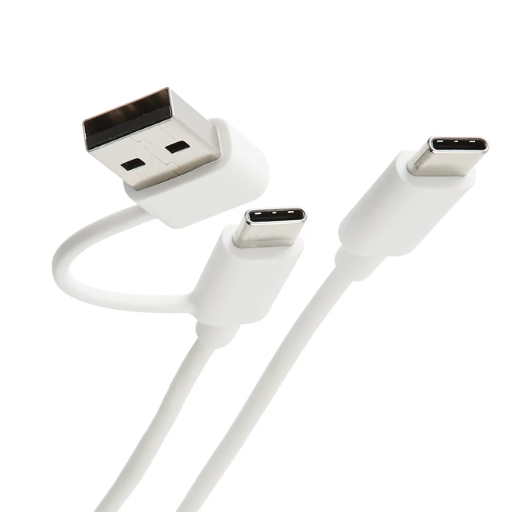
Since its creation, USB-C has gained massive popularity. The USB-C connector offers numerous improvements over older USB types, including faster data transmission, high power delivery for charging, and signal transmission for video. An excellent factor, really, on the user side is that the USB-C port is reversible, meaning one can insert the connector either way. The compact size of the USB-C port enables slimmer and lighter gadgets, such as smartphones, tablets, and laptop computers, which aligns with the current technology trend. So, it is easy to see how versatile and future-proof an application this USB-C connector can be.
Characteristics of USB-C
Universal Compatibility
USB-C supports a broader range of devices, serving as a platform for smartphones, laptops, tablets, and peripherals. It is intended to replace older USB standards and unify connectivity.
High-Speed Data Transfer
By supporting standards like USB 3.2 and Thunderbolt 4, USB-C can facilitate data transfers of up to 40 Gbps, enabling almost instantaneous file transfers and seamless connectivity for high-performance applications.
Enhanced Power Delivery
The USB-C standard supports charging of up to 240 watts, ensuring fast charging for a wide range of devices, including phones and laptops.
Video and Audio Transmission
USB-C transmits video signals to external displays at resolutions of up to 8K, supporting DisplayPort and HDMI alt modes, and also allows for audio transmission, thereby reducing the number of ports required for installation.
Reversible Design
The interfacing is completely symmetrical, which means no more frustrating insertion errors, making it very easy to use and convenient.
It is the durability and future-proof nature of USB-C that make it a very compatible standard with emerging technologies. This nature will help it adapt to future technological changes for its long-term usefulness.
Advantages of USB-C
Key Advantages
- Universal Compatibility: USB-C is a universal standard supported by nearly all devices, including smartphones, laptops, gaming consoles, and cameras. This feature gives USB-C a unique edge in versatility.
- Faster Data Transfer and Charging: While lightning-fast data transfer speeds have been offered with USB-C, as per USB 3.2 or Thunderbolt 4 standards, charging has been significantly faster than with USB 2.0. Additionally, downtimes during charging have been reduced.
- Compact and Reversible Design: Because of the compact, reversible design of the USB-C, you will never grow tired of trying to plug it the wrong way; manufacturers can, therefore, capitalize on making thin and lightweight devices.
Additional Benefits
- Support for Multiple Functions: USB-C cables and ports can do much more than just transfer data and power: they can also transmit video and audio signals. In fact, USB-C is replacing the likes of VGA, HDMI, and headphone ports in many instances.
- Future-Proof Technology: The fact that it can be constantly updated and tweaked to support new standards means that USB-C will remain relevant well into the future, really protecting your investment.
- Eco-Friendly and Cost-Effective: A great way to minimize e-waste and streamline setups while saving costs for the user is by using USB-C, which reduces the need for multiple cables and ports.
Common Applications of USB-C
- Charging Devices: Because it has a higher power level, USB-C can be used for fast charging of almost all devices, including cell phones, laptops, tablets, and other portable devices.
- Data Transfer: Because it enables high-speed data transmission, USB-C is used for transferring large files between devices, such as external hard drives, cameras, and computers. It supports data protocols such as USB 3.2 and Thunderbolt 3 for high-speed transmission.
- Display Connectivity: Display connectivity refers to the ability of USB-C to transmit video and audio signals, making it a common interface for monitors, TVs, and projectors. It supports standards such as DisplayPort and HDMI for high-resolution and multi-monitor setups.
- Docking Stations and Hubs: Most docking stations and hubs use USB-C to provide multiple connectors and ports for Ethernet, USB-A, HDMI, and other interfaces. This allows users to shrink their workstations to a matchbox interface.
- Audio Interfaces: This USB-C cable is also used for audio devices, such as microphones, headphones, and sound cards. Hence, in terms of better sound quality and facilitating the digital transmission of audio without requiring additional adapters, USB-C offers these benefits.
Such applications are a key reason why USB-C has become a standard in modern technology.
Comparing USB-A and USB-C
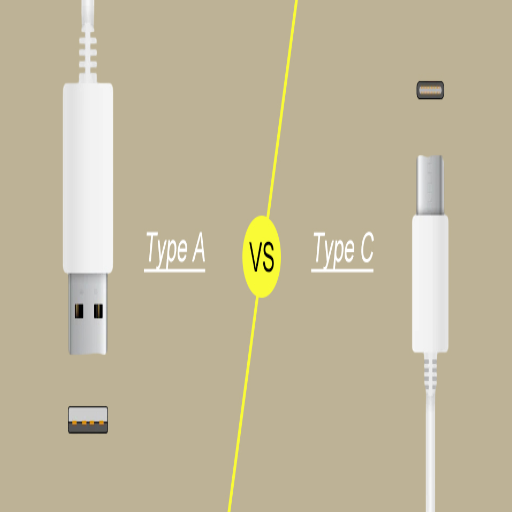
There are three main distinctions between USB-A and USB-C: design, speed, and functionality. In the case of the older USB-A standard, it is larger in size, rectangular, and connects only in one orientation. USB-C, being more versatile and user-friendly, is smaller and reversible. Being incredibly fast, USB-C can support massive data transfers, deliver immense power to charge devices, and also enable modern technologies such as 4K video output. This is why we see USB-C find its way into newer devices, with the ever-higher efficiency and convenience of USB-C being integrated into an older USB-A standard.
Key Differences Between USB-A and USB-C
| Feature | USB-A | USB-C |
|---|---|---|
| Design | Large, rectangular, one orientation | Small, oval-shaped, reversible |
| Max Speed | 5-10 Gbps (USB 3.x) | Up to 40 Gbps (USB4/Thunderbolt) |
| Power Delivery | 2.5-4.5 watts | Up to 240 watts |
| Video Output | No | Yes (up to 8K) |
| Audio Support | No | Yes |
| Future-Proofing | Legacy standard | Modern, evolving standard |
- Design and Reversibility: The USB-A connector features a large, rectangular shape and connects properly when inserted in the correct orientation. USB-C, in contrast, offers a smaller, oval-shaped design that is fully reversible, negating any frustration when trying to insert the cable.
- Speed and Performance: USB-C offers a faster data transfer rate, with versions such as USB 3.2 and USB4 capable of reaching speeds of 40Gbps. This is significantly faster than USB-A, which has a maximum speed of either 5Gbps or 10Gbps in its latest versions, making USB-C the ideal option for high-speed data-centric tasks.
- Power Delivery: USB-C can deliver power much higher than what USB-A can provide. USB-C, supporting the USB PD standard, can deliver power up to 240W, which means it will charge a laptop, smartphone, or really any high-powered device fast, while USB-A cannot.
- Compatibility and Features: USB-C is designed to support various technologies, including 4K video output, audio transmission, and Thunderbolt device compatibility. USB-A cannot perform such multifunction roles, with its usage generally limited to legacy devices.
- Adoption and Futureproofing: Due to its versatility and higher performance, USB-C has quickly become the port of choice in modern devices, including laptops, phones, and tablets. Though still alive, USB-A now seems better suited for older technologies and legacy peripherals.
These distinctions illustrate the reasons why USB-C should replace USB-A in modern technology.
Differences in Speed and Power Delivery
Speed & Power Comparison
USB-C: Up to 40 Gbps | Up to 240W
USB-A: 5-10 Gbps | 2.5-4.5W
The USB Type-C offers a significantly higher data transfer rate and power delivery compared to USB Type-A. It can transfer data at up to 40 Gbps (on USB 3.2, USB4), while for USB-A, the commonly accepted maximum speed is between 5 and 10 Gbps. For power delivery, it supports higher power delivery (up to 240 W), enabling fast charging of larger devices, such as laptops. The USB-A, on the other hand, delivers less power, typically ranging from 2.5 to 4.5 watts. This USB division makes USB Type-C very versatile and efficient for modern-day devices.
Compatibility and Adaptability
In compatibility terms, USB-C performs excellently, thanks to its reversible connector and the plethora of protocols it supports, including Thunderbolt, HDMI, and DisplayPort, which enable the transmission of data, video, and power through a single port. Modern gadgets, ranging from laptops to smartphones and even peripherals, are currently being designed for USB-C to minimize the need for multiple connectors. Older devices, however, all have USB-A ports, which require the use of an adapter or hub for interoperability. Speaking of adaptability: given the output power requirements of the converter, USB-C will adapt, seamlessly integrating across multiple ecosystems, even with legacy equipment. Hence, due to this adaptability, USB-C is the most essential ingredient in the recipe for future universal connectivity. However, the transition from USB-A to USB-C remains a significant challenge for older devices.
Which USB Connector Should You Choose?
Speed, versatility, and compatibility with modern devices should all be considered when choosing USB-C. It supports fast data transfer speeds and quicker charging. It is compatible with a wide range of devices, including phones, tablets, laptops, and more. For older devices with USB-A ports, adapters and hubs become necessary. For most users, I would deem USB-C to be the better choice in the long run, owing to its future-proofing features and increasing adoption.
Future Trends in USB Technology
Some aspects of USB technology are still changing, with upcoming trends favoring speed, efficiency, and versatility. One of the most significant developments was the Universal adoption of USB4, which allows for faster transfer speeds of 40Gbps, improved power delivery, and compatibility with Thunderbolt 3 and USB-C devices. This enables smooth interoperability among devices, eliminating the need for numerous standards.
USB-C, meanwhile, is being established as the de facto standard, endorsed by manufacturers worldwide. Its ability to carry data, power, and video at very high speeds is the most significant selling point for any design slated for production in the near future. Another aspect, which is gaining prominence, is eco-friendliness: many manufacturers are going so far as to integrate recyclable materials into their cables and connectors, while others focus on preventing e-waste by promoting universal compatibility.
Another trend to watch is therefore the integration of state-of-the-art technologies, such as USB PD 3.1. This allows the devices to be charged faster and at increased power levels, all the way up to 240W. USB-C thus paves the way for larger devices to be powered, including laptops and monitors, without worrying about proprietary charger incompatibility. USB technology will make life easier for users and also move towards sustainable solutions for connectivity in the long run.
Choosing the Right USB Connector for Your Needs
When selecting the correct USB connector for my needs, I consider the type of devices I’m using and the functionalities I require. For quick data transfers with device compatibility, USB-C always takes the lead due to its versatility and performance. If there are old devices that need to be connected, I strictly consider USB-A or adapters. For large devices that require charging, I strongly consider USB-C with Power Delivery support, as it ensures fast and efficient charging. Connectors are often chosen based on the needs for charging, data transfer, or device compatibility.
Final Thoughts on USB-A vs USB-C
It places significance on USB-A and USB-C, depending on the device and task requirements in question. USB-A is actively used, as it provides backward compatibility with a large number of older devices, fulfilling all needs, from connecting peripherals such as keyboards and mice to external hard drives. USB-C, in contrast, is the future of connectivity, offering significantly faster data transfer rates, more power for charging, and a reversible plug design that makes it easier to use. In almost all modern scenarios, USB-C is preferred due to its versatility and increasing adoption across smartphones, laptops, and accessories. However, having adapters or dual connectors will surely help bridge the gap between the two standards and allow for smooth integration in mixed environments. Ultimately, it is a choice of balancing backward compatibility and the need to perform and gain efficiency.
Reference Sources
Development of the Third Generation of Semiconductors with SiC and GaN as the Mainstay
Based on the Raspberry Pi Voice-Controlled Smart Home System
Design of an Electromagnetic Ultrasonic Data Acquisition and Analysis System Based on USB
Frequently Asked Questions (FAQs)
What are the main differences between USB-A and USB-C?
The main differences between USB-A and USB-C are their shape, data transfer speeds, and compatibility. USB-A is rectangular in shape and is primarily used for older devices, whereas USB-C is a versatile connector with a reversible design and impressive data transfer speeds. Additionally, USB-C can be used for charging, whereas USB-A cannot, which serves as another reason for USB-C to become the primary choice for modern devices.
What kinds of USB connectors are there?
There are several types of USB connectors, including USB-A, USB-B, and USB-C, each serving a distinct purpose. For instance, USB-A connectors are commonly used in computers and chargers. Meanwhile, USB-C connectors are gradually becoming the standard for newer smartphones and laptops because they can support faster data transfer and power delivery.
What was the difference between USB-A and USB-C regarding data transfer?
The USB-C supports much higher data transfer speeds than USB-A. A conventional USB-A cable supports data rates only up to those specified for USB 3.0, whereas USB-C supports USB 3.1 and USB 3.2, implying a potential for much higher data transfer speeds. Therefore, USB-C is more apt for transferring large files at faster speeds.
Can USB-C cables do power delivery?
Of course, USB-C cables provide USB power delivery, allowing devices to charge more rapidly and with higher wattages. That power delivery aspect means one USB-C cable can be used for both charging and data transfer, eliminating the need to carry separate power adapters.
How does USB-C fit in against the traditional types of USB?
Considered the most recent development in USB technology compared to traditional USB types, such as USB-A and USB-B, USB-C features a reversible design that simplifies connection. Coupled with high-speed data transfer and power delivery features, it tends to be more versatile than the older types.
What are the advantages of USB-C over USB-A?
USB-C is mechanically faster in terms of data transmission rates. USB-C connectors are more versatile, supporting data transfer and charging, and they are compatible with an almost unlimited range of devices, from smartphones to tablets and laptops.
Are USB-A flash drives still in use?
Yes, older USB-A flash drives are still relevant, especially for older devices that do not support USB-C. Many users commonly use USB-A flash drives for data storage and transfer as they support conventional USB ports.
What should I consider when making the decision to switch from USB-A to USB-C?
Depending on whether you are using USB-A or USB-C, consider the type of devices, the required data transfer speeds, and whether power delivery is needed. For modern devices, the USB-C interface represents a better option due to its faster speed and versatility. On the other hand, for older technology, USB-A may still be necessary.
The USB-C: an overview?
An overview of USB-C includes the significant features and capabilities offered by the USB-C standard. It provides the convenience of a reversible connector, supports faster data transfer speeds, can deliver power to devices, and remains compatible with virtually any type of device. USB-C continues to gain popularity due to its versatility and efficiency.